What is Julia and what are its advantages?
A brief history of Julia
Started in 2009 by Jeff Bezanson, Stefan Karpinski, Viral B. Shah, and Alan Edelman, the general-purpose programming language Julia was launched in 2012 as free and open source software. Version 1.0 was released in 2018.
Rust developer Graydon Hoare wrote an interesting post which places Julia in a historical context of programming languages.
Why another language?
JIT
Computer languages mostly fall into two categories: compiled languages and interpreted languages.
Compiled languages
Compiled languages require two steps:
in a first step the code you write in a human-readable format (the source code, usually in plain text) gets compiled into machine code
it is then this machine code that is used to process your data
So you write a script, compile it, then use it.
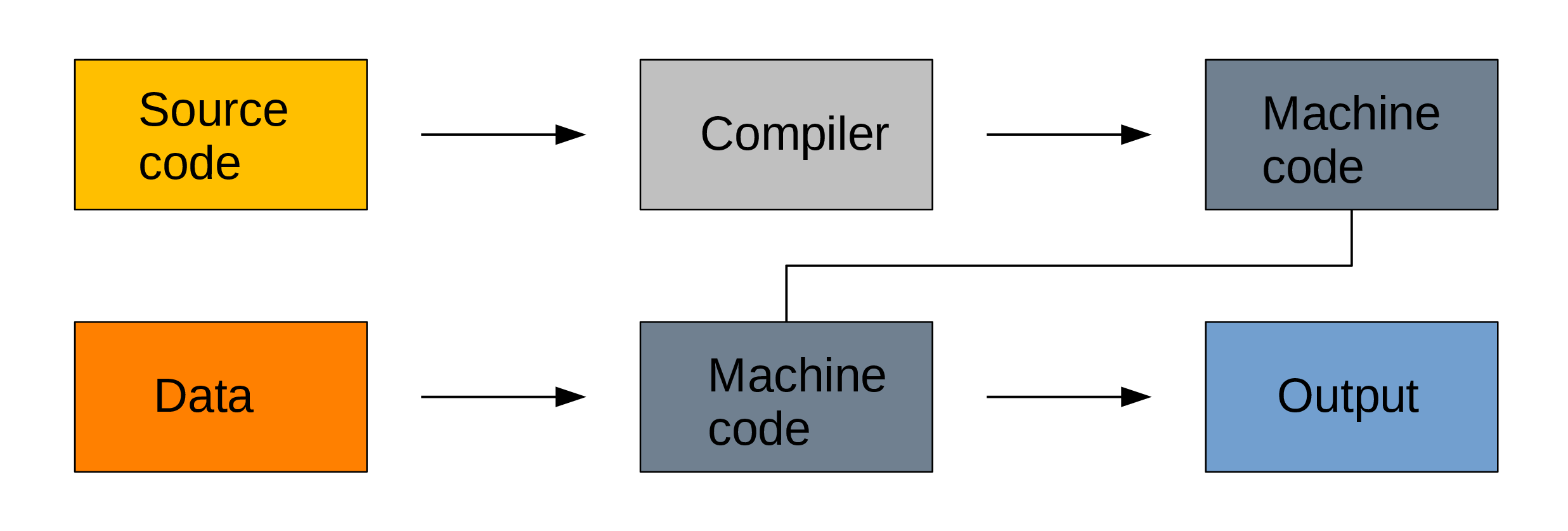
Because machine code is a lot easier to process by computers, compiled languages are fast. The two step process however makes prototyping new code less practical, these languages are hard to learn, and debugging compilation errors can be challenging.
Examples of compiled languages include C, C++, Fortran, Go, and Haskell.
Interpreted languages
Interpreted languages are executed directly which has many advantages such as dynamic typing and direct feed-back from the code and they are easy to learn, but this comes at the cost of efficiency. The source code can facultatively be bytecompiled into non human-readable, more compact, lower level bytecode which is read by the interpreter more efficiently.
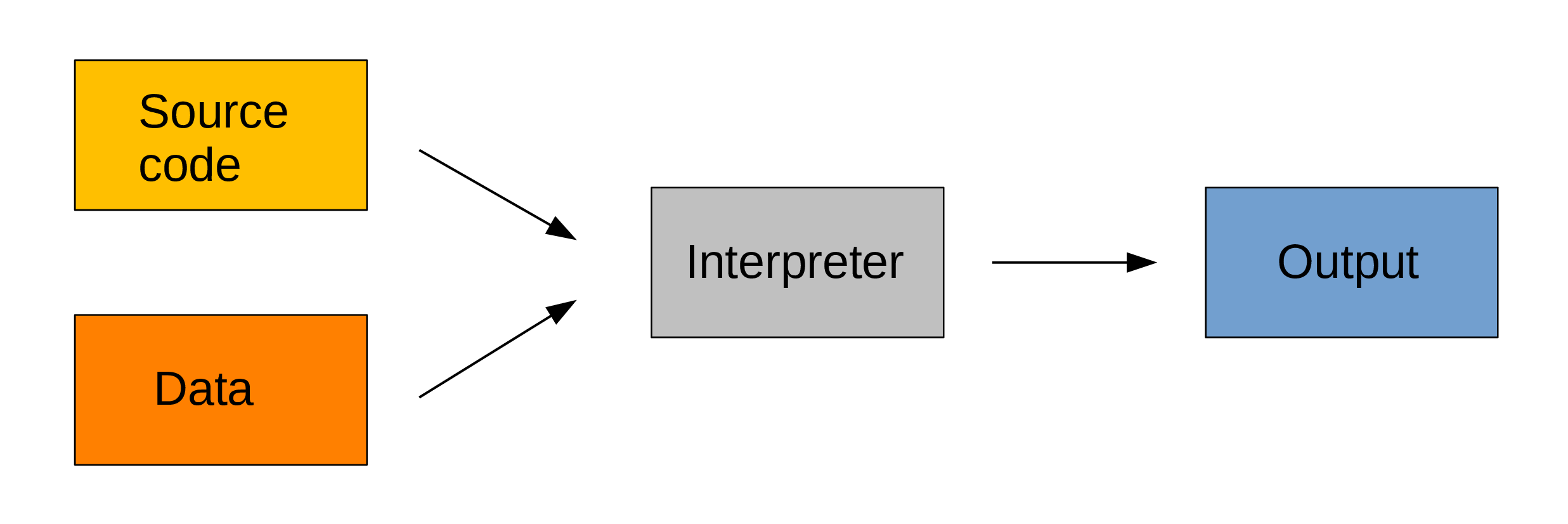
Examples of interpreted languages include R, Python, Perl, and JavaScript.
A common workflow
So, with this, what do researchers do?
A common workflow, with the constraints of either type of language, consists of:
- exploring the data and developing code using a sample of the data or reasonably light computations in an interpreted language,
- translating the code into a compiled language,
- finally throwing the full data and all the heavy duty computation at that optimized code.
This works and it works well.
But, as you can imagine, this roundabout approach is tedious, not to mention the fact that it involves mastering 2 languages.
JIT compiled languages
Julia uses just-in-time compilation or JIT based on LLVM: the source code is compiled at run time. This combines the flexibility of interpretation with the speed of compilation, bringing speed to an interactive language. It also allows for dynamic recompilation, continuous weighing of gains and costs of the compilation of parts of the code, and other on the fly optimizations.
Of course, there are costs here too. They come in the form of overhead time to compile code the first time it is run and increased memory usage.
Multiple dispatch
In languages with multiple dispatch, functions apply different methods at run time based on the type of the operands. This brings great type stability and improves speed.
Julia is extremely flexible: type declaration is not required. Out of convenience, you can forego the feature if you want. Specifying types however will greatly optimize your code.
Here is a good post on type stability, multiple dispatch, and Julia efficiency.
How to run Julia?
There are several ways to run Julia interactively:
- directly in the REPL (read–eval–print loop: the interactive Julia shell),
- in interactive notebooks (e.g. Jupyter, Pluto),
- in an editor able to run Julia interactively (e.g. Emacs, VS Code, Vim).
Let’s have a look at these interfaces.
The Julia REPL
You can launch the REPL from a terminal directly by typing the julia command.
REPL keybindings
In the REPL, you can use standard command line keybindings (Emacs kbd):
C-c     cancel
C-d     quit
C-l     clear console

C-u     kill from the start of line
C-k     kill until the end of line

C-a     go to start of line
C-e     go to end of line

C-f     move forward one character
C-b     move backward one character

M-f     move forward one word
M-b     move backward one word

C-d     delete forward one character
C-h     delete backward one character

M-d     delete forward one word
M-Backspace delete backward one word

C-p     previous command
C-n     next command

C-r     backward search
C-s     forward search
REPL modes
The Julia REPL is unique in that it has four distinct modes:
julia> The main mode in which you will be running your code.
help?> A mode to easily access documentation.
shell> A mode in which you can run bash commands from within Julia.
(env) pkg> A mode to easily perform actions on packages with Julia package manager.
env is the name of your current project environment.
Project environments are similar to Python’s virtual environments and allow you, for instance, to have different package versions for different projects. By default, it is the current Julia version. So what you will see is (@v1.12) pkg>.
Enter the various modes by typing ?, ;, and ]. Go back to the regular mode with the Backspace key.
Text editors
Emacs
There are various ways to use Julia in Emacs:
Interactive notebooks
Jupyter
Project Jupyter allows you to create interactive programming documents through its web-based JupyterLab environment and its Jupyter Notebook.
Pluto
The Julia package Pluto is a reactive notebook for Julia.
Quarto
Quarto builds interactive documents with code and runs Julia through Jupyter.
Startup options
You can configure Julia by creating the file ~/.julia/config/startup.jl.
Help and documentation
As we already saw, you can type ? to enter the help mode:
search: sum sum! summary cumsum cumsum! isnumeric VersionNumber issubnormal
get_zero_subnormals set_zero_subnormals

  sum(f, itr; [init])

  Sum the results of calling function f on each element of itr.

  The return type is Int for signed integers of less than system word size,
  and UInt for unsigned integers of less than system word size. For all other
  arguments a common return type is found to which all arguments are promoted.

  The value returned for empty itr can be specified by init. It must be the
  additive identity (i.e. zero) as it is unspecified whether init is used for
  non-empty collections.
I truncated this output as the documentation also contains many examples.
To print the list of functions containing a certain word in their description, you can use apropos().
Base.IOBuffer
Base.truncate
Base.rtruncate
Core.String
Base.div
Base.ltruncate
Base.open
Base.dump
Base.trunc
Base.IOContext
Base.open_flags
Base.ctruncate
Base.Broadcast.newindex
LinearAlgebra.eigen
LinearAlgebra.svd
Dates.format
Base.trunc
Dates.Date
NetworkOptions
LibGit2.isshallow
LibGit2.clone
ArgTools
Downloads.Curl
REPL.History.print_candidate
QuartoNotebookWorker.Packages.IOCapture.capture