from collections import Counter
from pathlib import Path

import datasets as hf
import torch
from matplotlib import pyplot as plt
from PIL import Image
from torch.utils.data import Dataset, random_split
from torchvision.datasets import EuroSATDatasets
While last section uses synthetic data, projects usually require real data.
In this section, we look at three ways to obtain data: Torchvision built-in datasets, Hugging Face Hub, and your own data read with a custom class.
Our working dataset: EuroSAT
Throughout this course we will use a single task: classifying satellite images by land use. EuroSAT is a set of 27,000 small (64 × 64 pixels) RGB patches from Sentinel-2 images, each labelled with one of 10 land-use classes.
It is a good fit for us: real research data (remote sensing), yet small enough (~90 MiB) to download and train on quickly, even on modest GPUs. It is distributed under an MIT licence (credit: Helber et al. 2019).
Packages
torch.utils.dataholds the dataset machinery: theDatasetbase class andrandom_split.torchvision.datasetsprovides ready-made vision datasets,EuroSATamong them.datasetsis the Hugging Face data library.PIL.Imageopens image files andCounterwill tally labels.
Torchvision datasets
eurosat = EuroSAT(root="data", download=True)
print(len(eurosat), "images")
print(eurosat.classes)
27000 images
['AnnualCrop', 'Forest', 'HerbaceousVegetation', 'Highway', 'Industrial', 'Pasture', 'PermanentCrop', 'Residential', 'River', 'SeaLake']download=True fetches and extracts the archive into data/ on the first run, then detects the files and skips the download. On disk, this is the classic layout, one folder per class:
data/eurosat/2750/AnnualCrop/AnnualCrop_1.jpg data/eurosat/2750/Forest/Forest_1.jpg …
Dataset classes holding data for PyTorch must implement the functions __init__ (instantiates the class), __len__ (returns the number of samples in the dataset) and __getitem__ (returns one sample at a time).
img, label = eurosat[0]
print(type(img).__name__, img.size, img.mode)
print(label, eurosat.classes[label])
Image (64, 64) RGB
0 AnnualCrop- Images are not read when the dataset is created: initialization only scans file names, and indexing decodes that one image.
- We get a PIL image, not a tensor: converting images to tensors happens in preprocessing (a later page covers transforms).
- The label is the index of the class in
eurosat.classes(alphabetical, so the numbering is stable).
Let’s display one image for each class:
fig, axes = plt.subplots(2, 5, figsize=(12, 5))
for ax, cls in zip(axes.flat, range(len(eurosat.classes))):
    img, _ = eurosat[eurosat.targets.index(cls)]
    ax.imshow(img)
    ax.set_title(eurosat.classes[cls], fontsize=9)
    ax.axis("off")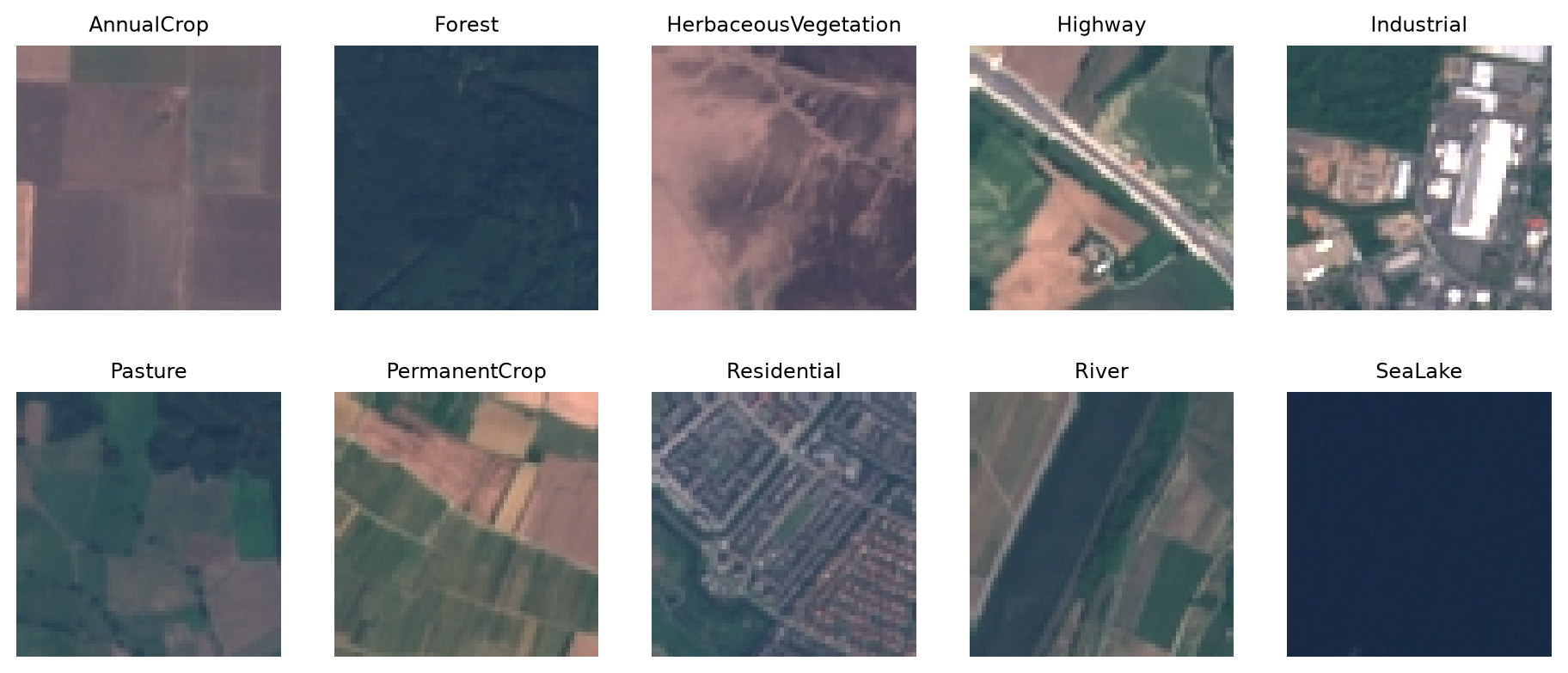
Class balance
Never trust a dataset to be balanced. eurosat.targets holds the labels:
counts = Counter(eurosat.targets)
for i, name in enumerate(eurosat.classes):
    print(f"{name:>22} {counts[i]}")
AnnualCrop 3000
Forest 3000
HerbaceousVegetation 3000
Highway 2500
Industrial 2500
Pasture 2000
PermanentCrop 2500
Residential 3000
River 2500
SeaLake 3000fig, ax = plt.subplots(figsize=(7, 4))
ax.barh(eurosat.classes, [counts[c] for c in range(10)])
ax.set_xlabel("number of images")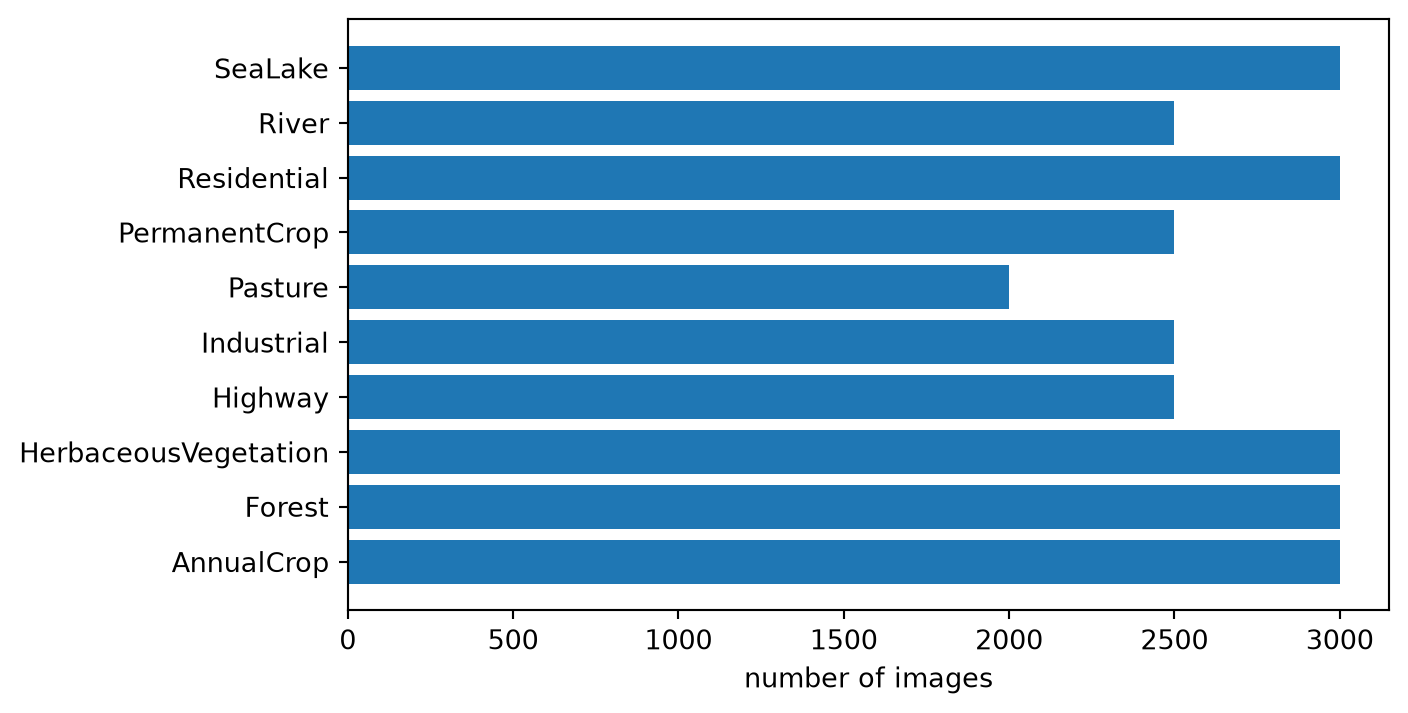
EuroSAT has 2,000 to 3,000 images per class: a mild imbalance. When classes are heavily skewed, a high accuracy can hide a model that ignores the rare classes entirely; we will come back to this when evaluating models.
Train and validation sets
Never evaluate a model on data it learned from.
We split EuroSAT, 80% for training and 20% for validation:
train, val = random_split(
    eurosat, [0.8, 0.2], generator=torch.Generator().manual_seed(42)
)
print(len(train), len(val), type(train).__name__)
21600 5400 Subsetrandom_splitreturns twoSubsetobjects: thin views holding lists of indices intoeurosat. No image is copied.- The seeded generator makes the shuffle reproducible.
Subsets satisfy the Dataset contract too: they can be indexed, or wrapped in DataLoaders (next page).
random_split does not respect class balance. With EuroSAT’s mild imbalance this hardly matters, but on small or heavily skewed data, draw a stratified split yourself (same class proportions in both parts).
Your turn:
Check that train and val are disjoint: no index should appear in both. Hint: set().
The rest of the course must evaluate on this exact validation set, or numbers from different pages would not be comparable. So we save the index lists once:
torch.save({"train": train.indices, "val": val.indices}, "data/split.pt")Later pages reload them with:
idx = torch.load("data/split.pt", weights_only=True)
train = torch.utils.data.Subset(eurosat, idx["train"])
Hugging Face Hub
The Hub mirrors thousands of datasets and researchers increasingly share their data there. The datasets library downloads and caches them, carries metadata along, preprocesses in parallel, and streams datasets too big to fit on disk.
eurosat_hf = hf.load_dataset("blanchon/EuroSAT_RGB")
train_hf = eurosat_hf["train"]
print(train_hf)
Dataset({
features: ['image', 'label', 'filename'],
num_rows: 16200
})The first call downloads the data into ~/.cache/huggingface; later calls hit the cache and return instantly. We get a DatasetDict of named splits: this copy of EuroSAT comes pre-split into train/validation/test.
label_meta = train_hf.features["label"]
print(label_meta.names)
['Annual Crop', 'Forest', 'Herbaceous Vegetation', 'Highway', 'Industrial Buildings', 'Pasture', 'Permanent Crop', 'Residential Buildings', 'River', 'SeaLake']The labels come documented with the data: the label column is a ClassLabel feature that knows the class names.
print(train_hf[0]["label"], train_hf[0]["filename"])0 AnnualCrop_1.tifIndexing an HF dataset returns a dict, not a tuple: columns have names instead of positions.
.map applies a function to every example, in parallel (num_proc=), and caches the result on disk, keyed by a fingerprint of the function. Try running this next cell twice:
def add_label_name(example):
    return {"label_name": label_meta.int2str(example["label"])}

train_hf = train_hf.map(add_label_name)
print(train_hf[0]["label_name"])
Annual CropWith streaming=True, examples arrive shard by shard as they download. There is no len() and no random access: a way to peek into a dataset without storing it.
stream = hf.load_dataset("blanchon/EuroSAT_RGB", split="train", streaming=True)
first = next(iter(stream))
print(first["filename"])AnnualCrop_1.tifHF datasets satisfy the same __len__/__getitem__ contract (with dict examples), so they plug into the same DataLoaders as everything else; with_format("torch") returns the labels as tensors.
Custom Dataset
The most common situation of all: a folder of images on your machine, arranged somehow, that you need to train on. If they sit in one folder per class (exactly the layout EuroSAT uses on disk), a dozen lines give you a Dataset:
class ImageFiles(Dataset):
    """Images in one subfolder per class under root; labels from folder names."""

    def __init__(self, root, transform=None, extensions=(".jpg", ".jpeg", ".png")):
        root = Path(root)
        # sorted: alphabetical class names give deterministic, portable
        # label indices (the same convention as ImageFolder)
        self.classes = sorted(p.name for p in root.iterdir() if p.is_dir())
        self.class_to_idx = {name: i for i, name in enumerate(self.classes)}
        self.transform = transform
        # scan the file list once (paths only: no image is read yet);
        # walking class by class gives ImageFolder's order
        self.samples = [
            (path, label)
            for label, name in enumerate(self.classes)
            for path in sorted((root / name).iterdir())
            if path.suffix.lower() in extensions
        ]

    def __len__(self):
        return len(self.samples)

    def __getitem__(self, index):
        path, label = self.samples[index]
        # convert("RGB"): one stray grayscale or RGBA file should not
        # crash a training run
        img = Image.open(path).convert("RGB")
        if self.transform is not None:  # used on the preprocessing page
            img = self.transform(img)
return img, label__init__scans the tree once and stores(path, label)pairs: paths only, no image is opened. Classes are sorted alphabetically, the same convention asImageFolder, so label numbering matches.__getitem__opens one image per call: decoding on demand is what will let worker processes parallelize the reading (next page)..convert("RGB")prevents one stray grayscale or RGBA file from crashing training.transformis the hook where preprocessing will plug in (a later page).
Let’s point it at the EuroSAT tree:
eurosat_custom = ImageFiles(Path("data") / "eurosat" / "2750")
img, label = eurosat_custom[0]
print(len(eurosat_custom), "images,", len(eurosat_custom.classes), "classes")
print(type(img).__name__, img.size, "->", label, eurosat_custom.classes[label])
27000 images, 10 classes
Image (64, 64) -> 0 AnnualCropComparison with Torchvision
print(eurosat_custom.classes == eurosat.classes)Trueprint([lbl for _, lbl in eurosat_custom.samples] == eurosat.targets)TrueOur dataset agrees with Torchvision’s reader, class for class and label for label. torchvision.datasets.ImageFolder is actually exactly the class we defined. If your data is more messy, you can adapt this class to transform and tidy it. Our section on data preprocessing in our deep learning course with the JAX AI stack goes into this in a lot more details.